The blue logo of MacVector, inc.
  • Getting Started
    • What can MacVector do for my lab?
    • Overview
    • Sequence Assembly
    • Common workflows for the molecular biologist
    • Comparing sequences
    • Getting your sequence into MacVector
    • Importing sequences
    • Where to start
    • Primer design
    • Tutorials
  • Free Trial
  • Pricing
    • Pricing
    • Purchase online
    • Student and Postdoc licenses
    • What type of license should I buy?
      • MacVector Free
      • Maintenance
    • Quote Request
      • CeresBio
      • VtR Incorporated
      • VtR Incorporated
  • Support
    • Legal Information
    • Compatibility of older versions
    • Privacy and Security Policy
    • Downloads
    • InstallersInstallers of the current version of MacVector and older ones.
    • System Requirements
    • Tutorials
    • What’s New in MacVector.
    • Weekly Tips
  • Contact us
    • Email Options
  • Blog
    • Archives
    • Press releases
    • Testimonials
    • Weekly Tips

  • Use a right-click in the Editor tab to see if your contig can be circularized

    MacVector incorporates no less than THREE different de novo assemblers, phrap, velvet and SPAdes. While all are great assemblers, with each having their own specific advantages, none of them will generate a circular sequence from input reads. However, MacVector also includes a tool to help you with this. If you are assembling reads representing plasmid…

    Read more: Use a right-click in the Editor tab to see if your contig can be circularized
    Sep 6, 2019

    —

    by

    Chris
    in Techniques, Tips

  • Import Multi-Sequence Genbank Files into an Assembly Project for easy access to Features

    There are many genomes in the Genbank database that cannot be downloaded as single annotated sequences. These might be large multi-chromosome eukaryotic genomes, but, increasingly, partially sequenced bacterial chromosomes where the major contigs have been annotated using the NCBI annotation pipeline. Typically, when you encounter these, there are options to download annotated versions of these…

    Read more: Import Multi-Sequence Genbank Files into an Assembly Project for easy access to Features
    Sep 6, 2019

    —

    by

    Chris
    in Techniques, Tips

  • Opening Genbank or FASTA files with multiple sequences as individual sequences

    Many sequence formats contain multiple concatenated sequence entries. For example FASTA and Genbank are two formats capable of storing multiple individual sequences. By default MacVector will treat such sequences as alignments and open them in the Multiple Sequence Alignment editor. Most users who want to open such a file do want to see an alignment.…

    Read more: Opening Genbank or FASTA files with multiple sequences as individual sequences
    Sep 6, 2019

    —

    by

    Chris
    in Tips

  • HOW DO I video guides to common molecular biology workflows

    MacVector has a wide array of different tools for working with protein and DNA sequences. MacVector has always been designed with the Mac’s simplicity in mind and getting started with simple tasks is quick. However, making the most of the many functions and getting familiar with MacVector’s wide range of tools does require more help…

    Read more: HOW DO I video guides to common molecular biology workflows
    Feb 27, 2019

    —

    by

    Chris
    in Tips

  • Show or hide the RE Picker and the Graphics Palette from the toolbar

    MacVector 17’s brand new Restriction Enzyme Picker gives you an interactive way to quickly show what enzymes will digest your sequence. You can dynamically filter what sites are displayed. For example to show just 3’ overhang cutters or use other criteria. What’s more is that you can take a set of cut sites from one…

    Read more: Show or hide the RE Picker and the Graphics Palette from the toolbar
    Feb 8, 2019

    —

    by

    Chris
    in Tips

  • Scan For… Missing Primers: Automatic Primer Binding Site Display

    One new feature in our MacVector 17 release is the ability to automatically display primer binding sites in each DNA sequence that you open. Here’s an example of a couple of primers displayed on the popular pET 47b LIC cloning vector on each side of the LIC cloning site. The image shows how MacVector 17…

    Read more: Scan For… Missing Primers: Automatic Primer Binding Site Display
    Feb 5, 2019

    —

    by

    Chris
    in Releases, Tips

  • Restoring file associations when MacVector no longer opens your sequence documents.

    Macs are pretty good at choosing the right application to open a document. For example when you double click on a .nucl document then it will open in MacVector. However, sometimes this file association breaks. Applications should coexist peacefully on a Mac, but sometimes a misbehaving app will corrupt these file associations and you will…

    Read more: Restoring file associations when MacVector no longer opens your sequence documents.
    Jan 30, 2019

    —

    by

    Chris
    in Tips

  • How to find one-out Restriction Sites that will change a protein coding sequence

    If you are interested in making changes to a protein sequence, it is often useful to make a change to the coding DNA that will create a restriction enzyme site. Conversely, there may be times that you would like to create a site without affecting a protein coding region. You can accomplish this using the…

    Read more: How to find one-out Restriction Sites that will change a protein coding sequence
    Jan 21, 2019

    —

    by

    Chris
    in Tips

  • Comparing multiple reference assemblies

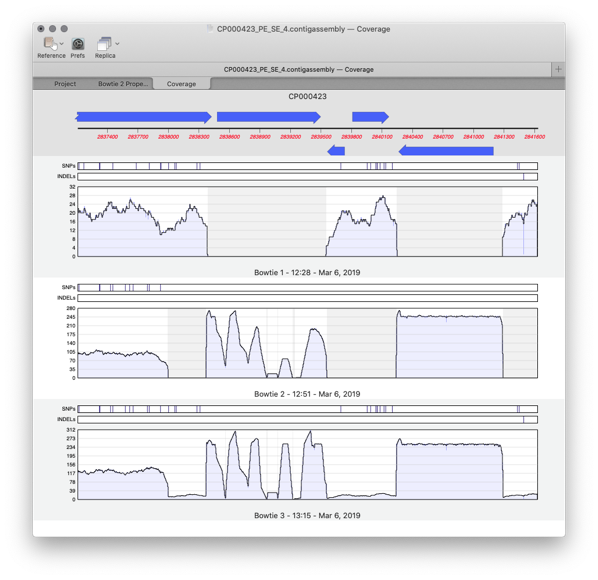
    MacVector 17 has a greatly improved Assembly Projects manager, for better organization of multiple sequencing datasets, multiple references sequences and repeated jobs. Every time you run a new assembly job (either a reference assembly or de novo). A new job object is created in the Assembly Project window contains resulting contigs and any unaligned reads…

    Read more: Comparing multiple reference assemblies
    Dec 17, 2018

    —

    by

    Chris
    in Releases, Techniques, Tips

  • Making restriction enzyme cloning easier with MacVector’s Restriction Enzyme Picker.

    MacVector 17’s brand new Restriction Enzyme Picker is a new floating tool for selecting and filtering Restriction Enzymes to simplify the identification of useful enzyme cut sites. It initially presents you with a list of all available sites in a sequence. However, you can filter on many attributes, such as number of cuts, 5’ or…
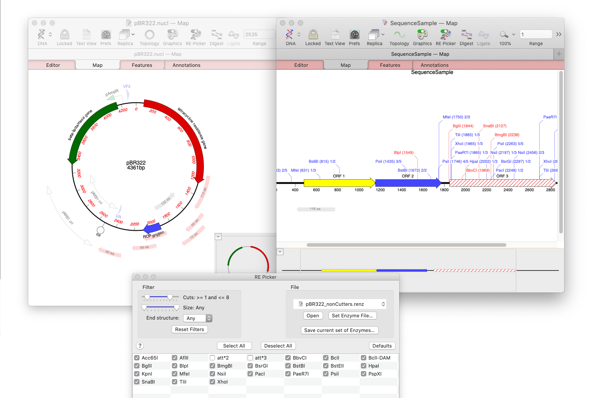
    Read more: Making restriction enzyme cloning easier with MacVector’s Restriction Enzyme Picker.
    Dec 6, 2018

    —

    by

    Chris
    in Releases, Tips
←Previous Page
1 … 7 8 9 10 11 … 28
Next Page→

Workflows

  • Primer Design
  • Cloning
  • Sequence Assembly
  • CRISPR
  • Gibson Assembly

Assembly

  • Sequence Assembly
  • Genome finishing
  • Comparison with Sequencher

Resources

  • Privacy Policy
  • What’s New
  • Testimonials
  • Downloads

Support

  • Compatibility
  • Contact us
  • Importing sequences
  • Support

Social

  • Facebook
  • Instagram
  • Twitter/X

We produce software for the molecular biologist with a Mac!

The blue logo of MacVector, inc.
