

Overview
MacVector 26 is our latest release and it’s a big one. MacVector 26 has new features for designing and documenting cloning workflows and for managing your sequences. The new Cloning Project Manager allows you to design Golden Gate Cloning workflows. So together with Ligase Independent Cloning, Gibson Assembly and traditional restriction enzyme based cloning projects you now have a single place to manage cloning projects. Together with the Cloning Clipboard this makes MacVector the premier tool to help molecular biologists design and document cloning workflows, whatever the cloning method used, with ease.
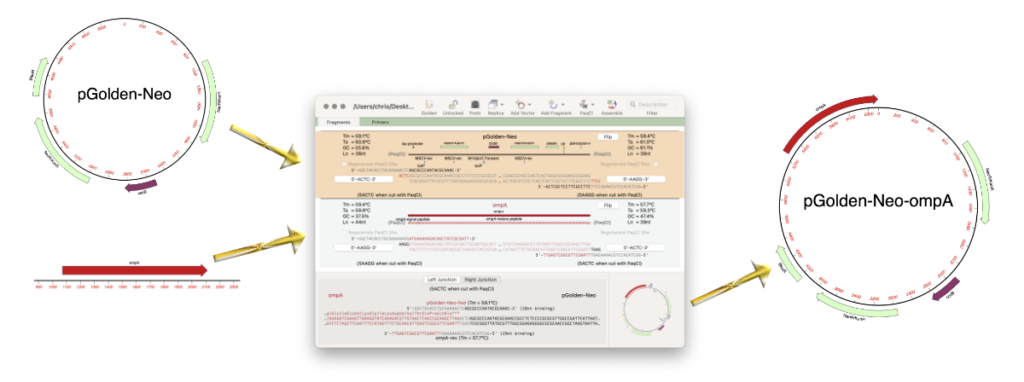
As well as the addition of the Cloning Project Manager, the Assembly Project Manager has been renamed to the Sequence Project Manager because now there’s a lot more functionality than just sequence assembly. These two new tools will make organising your sequence analysis workflows easier than ever!
As well as new tools for cloning there has been significant changes to bring MacVector into line with the latest versions of macOS. Following Apple’s guidelines MacVector is now a Sandboxed application.
MacVector 26 is a Universal Binary supported on any Intel or Apple Silicon Macintosh running macOS 11.5 (Big Sur) to macOS Tahoe (26).
Why the version jump?
Over the last 12 months, Apple have committed to numbering their operating system release by year, so macOS Tahoe is macOS 26. That makes it easy to remember the release year. Accordingly, we have decided to match that, so, going forwards, all major MacVector releases will be numbered based on the year of release. We will still release complimentary bug fixes as e.g. “26.0.1” etc, so there may be complimentary maintenance releases in 2027 that still have “26” as the initial version number.
Golden Gate Cloning
One of the major new functions is support for the popular Golden Gate Cloning strategy. The basic idea behind this is that you can design primers to create PCR products where you can cut with Type IIS enzymes that asymmetrically cleave to one side leaving 4 nt overhangs and design multiple inserts, each with a different but complementary 4 nt overhang such that you can (potentially) assemble 20 or more fragments to a viable clone in a one-pot reaction. MacVector’s Cloning Project Manager goes way beyond simple Golden Gate Cloning interfaces such as the popular NCBI tool.
With MacVector’s Cloning Project Manager designing and documenting Golden Gate Cloning workflows is easy. A typical workflow would be:
- Select a vector.
- Drag and drop one or more features (e.g. a gene, an expression tag etc.) to your cloning project.
- Choose a suitable Type II enzyme.
That’s it! In all cases MacVector will sort fragments and also automatically generate primers if needed to make them assemble.
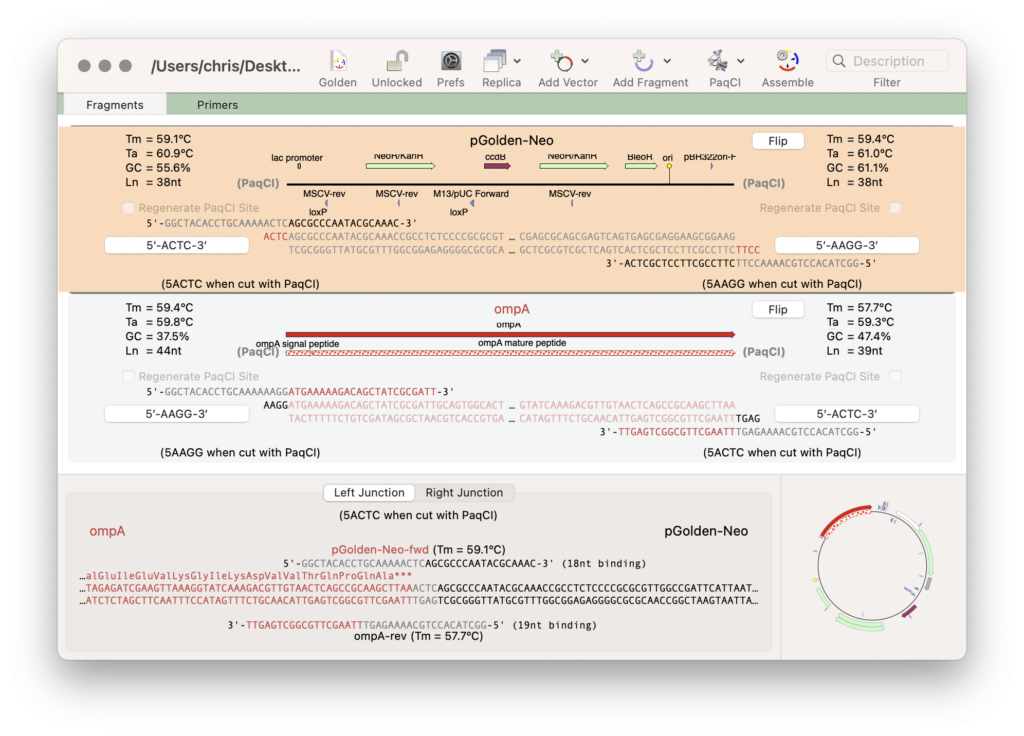
The Cloning Project Manager has many useful features to design and document from simple to very complex Golden Gate Cloning workflows.
- Fragments to clone can be blunt ended or digested.
- You can edit any primer to modify open reading frames.
- View the junctions between fragments to confirm the fusion protein is correct.
- Export the predicted result of the assembly as a new sequence.
- Export a list of all the required primers
- …and (perhaps most impressive of all), if you drag and drop a bunch of existing constructs to the Cloning Project Manager then MacVector will automatically work out if a new construct can be created by combining those vectors, the selected enzyme and T4 DNA ligase into the same one-pot tube. Fans of the MoClo system (and many similar) should love this.
Cloning Project Manager
To support Golden Gate Cloning there’s a new Cloning Project Manager. This allows you to design and document cloning workflows using an intuitive drag and drop of vector, inserts and more.
- Golden Gate Cloning
- Gibson Assembly
- Ligase Independent Cloning
- Restriction enzyme based cloning
Batch BLAST of Protein Sequences
You can now batch BLAST protein sequences. Just add one or more protein sequences to the Sequence Project Manager and select Database | Online Search for Similar Sequences (BLAST)… and this will run BLAST on the selected sequences. The results contain a summary window that lists the best hits for each protein sequence
Sequence Project Manager
Because of the increasing functionality that has been added we have renamed the Assembly Project manager to Sequence Project Manager. It’s not just that you can now batch BLAST protein sequences as you can also batch translate CDS features across multiple sequences, batch Auto Annotate sequences and more. Future releases of MacVector will take advantage of this to use the Sequence Project Manager as a general organizational project for sequences where many different analysis functions will be able to directly operate on items in the projects.
MacVector is now a sandboxed application
At MacVector, we do try to look ahead and future-proof MacVector against Apple’s announced or predicted changes to macOS so that your purchased version will have a long life on future machines and with macOS updates. Apple have been encouraging developers to enable applications to run in a macOS “sandbox” for a number of years. Currently, any applications downloaded from the App Store must be sandbox enabled. Apple have made it clear that at some stage ALL applications will have to be sandbox-enabled to run on future macOS releases. So that includes MacVector.
What is a Sandbox?
The basic concept of a “sandbox” is that any application only has access to a very restricted file system – that way, a rogue or poorly implemented application cannot intentionally or accidentally corrupt your file system or steal your data. Typically, for simple applications, you would never realize it was running in a sandbox. You run the app, open a file, save a file and all looks great.
Why is it a Problem for MacVector
The problem comes when an application tries to access a file that you have not specifically “blessed” by choosing it through a file dialog. MacVector has many of these – there are default files for Restriction Enzyme Analysis, Primer Database searches, Gel Markers, Codon Usage analysis etc. Unless you have specifically changed the selection, MacVector will be denied access to the file when it tries to run an analysis with the default data files
How Did We Solve the Problem?
MacVector now contains an internal copy of all its default auxiliary files and copies those into a specific location in the sandbox, recommended by Apple. MacVector can then freely access the files in that location. You can add your own files to that location, edit the files, copy them or do anything you want with them.
All Internal 3rd Party Executables Are Now Universal Binaries
MacVector itself, and most of the embedded 3rd party executables like ClustalW, phred/phrap/cross_match, primer3 etc, have been Universal Binaries since MacVector 18.2 was released. However, some of the executables needed significant rewrites to generate Apple Silicon binaries. The last two holdouts were bowtie2 and the embedded perl that we ship within MacVector. With MacVector 26 these are now both Universal Binaries. This will prevent any messages from macOS warning about components within MacVector needing to be updated and will ensure forward compatibility with future macOS releases when support for Intel binaries is withdrawn. As a bonus, Bowtie assemblies are now a little faster on Apple Silicon machines.
Minor Enhancements and Bug Fixes
The setting in the Translation analysis dialog are now correctly remembered between invocations.
When you download a fragment from the BLAST Map tab, the downloaded fragment now contains an additional ~1kb of sequence from either side of the hit region. For many matches to genomes or large sequences, this allows you to easily retrieve a more informative segment of DNA containing the features of interest around your hit.
There is a new Analyze | Optimize CDS… menu item. This is active whenever a CDS feature is selected in a sequence. This functionality was available previously only as a context-sensitive right-click option.
The File | New menu now has separate entries for the various cloning project implementations within MacVector: Gibson Assembly, Ligation Independent Cloning, Golden Gate Cloning and Pre-existing Fragment Assembly.
You can now export features in GFF format.