

Tag: OSX
-
MacVector and macOS Mojave
Apple released macOS Mojave today (Tuesday 25th September). Over the past few months we have performed preliminary testing with MacVector 16.0.9 on various development releases of macOS Mojave through its development cycle and all appears to be well. So whereas we cannot state MacVector is compatible until it is officially released, we can say that…
-
MacVector and future releases of macOS
The next OS release for the Mac will arrive later this year. MacOS Mojave is a significant OS upgrade and includes a lot of new features, especially when compared with the differences between OS X El Capitan, macOS Sierra and macOS High Sierra. Our developers have been hard at work ensuring that when macOS Mojave…
-
Get ready for the release of macOS High Sierra with a 30% discount on all MacVector upgrades
macOS® High Sierra will be released Monday 25th of September. Whether you intend to upgrade early, or months later, you’ll be pleased to know that MacVector 15.5 (the current version) and MacVector 16 (our upcoming release) are both fully supported and compatible with macOS High Sierra. During October we do have a 30% discount on…
-
Organising your sequences using Smart Folders
OS X’s Finder has many features for quickly finding and working with your files. Spotlight Search is one such tool that most Mac users are familiar with. However, Smart Folders is a tool that is very useful but often overlooked. Smart Folders allow you to create a dynamic folder whose contents are derived from a…
-
Opening matching sequences from an Align To Folder search
You can use the Database->Align To Folder menu function in MacVector to quickly search any set of folders on your hard drive for matching sequences. Its like having your own personal BLAST search that just scans files of interest to you. The great thing is, when you find matching sequences, you can easily open them…
-
Smart Folders and MacVector
OS X’s Finder has many features for quickly finding and working with your files. Spotlight Search is one such tool that most Mac users are familiar with. However, Smart Folders is a tool that is very useful but often overlooked. Smart Folders allow you to create a dynamic folder whose contents are derived from a…
-
MacVector 14.0.4 is OS X 10.11 El Capitan compatible.
OS X 10.11 El Capitan was released last week. We’ve been testing MacVector on the developer releases of OS X EL Capitan in the run up to the official release. However, as usual we prefer to fully test on an official release of OS X before saying that MacVector is supported. We’ve now done so…
-
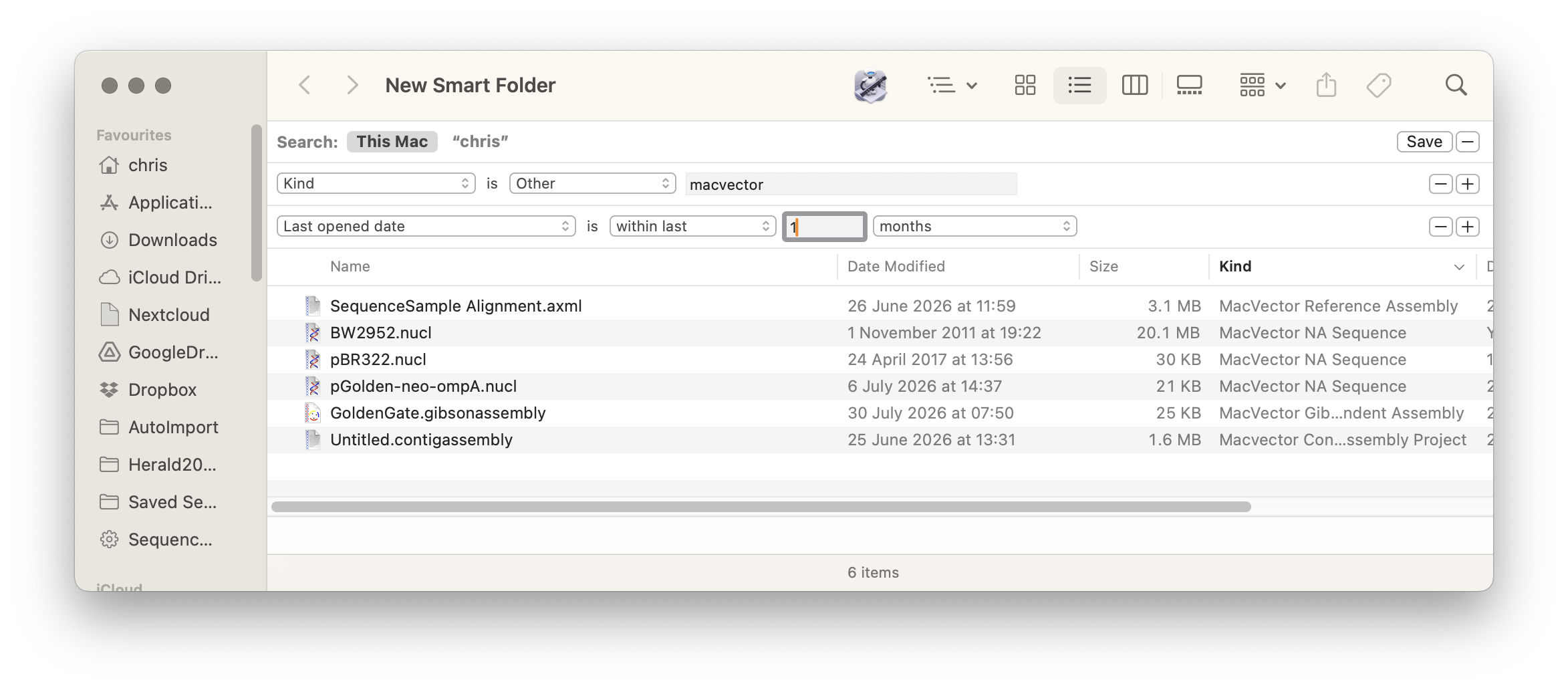
Smart Folders and MacVector
MacOS Finder has many features for quickly finding and working with your files. Spotlight Search is one such tool that most Mac users are familiar with. However, Smart Folders is a tool that is very useful but often overlooked. Smart Folders allow you to create a dynamic folder whose contents are derived from a Spotlight…
-
UNIX line endings for plain text files
Sometimes you may need to export data out of MacVector for further analysis with a command line tool or sending a file to a colleague who does not have MacVector). For example exporting the VCF report out of a reference assembly or exporting a sequence into Genbank format. If these files are plain text, then…
-
MacVector and Yosemite
OS X Yosemite was released today. As you no doubt already know Yosemite has a new flat look. The system font has changed to Helvetica as well. All in all after a few hours of using it we think the interface looks superb. As usual we’ve been testing MacVector on developer editions of Yosemite since…