

Tag: annotation
-
Use Database | Auto-Annotate Sequence to annotate prokaryotic genomes
The continuing advances in Next Generation Sequencing have made it relatively low cost to sequence prokaryotic genomes. Many scientists are embarking on large projects to sequence multiple related genomes. These might be clinical isolates of the same species exhibiting different pathogenetic properties, environmental isolates from different sites, or a study over time of the changes…
-
Automatically displaying open reading frames with MacVector’s Scan For Open Reading Frames tool
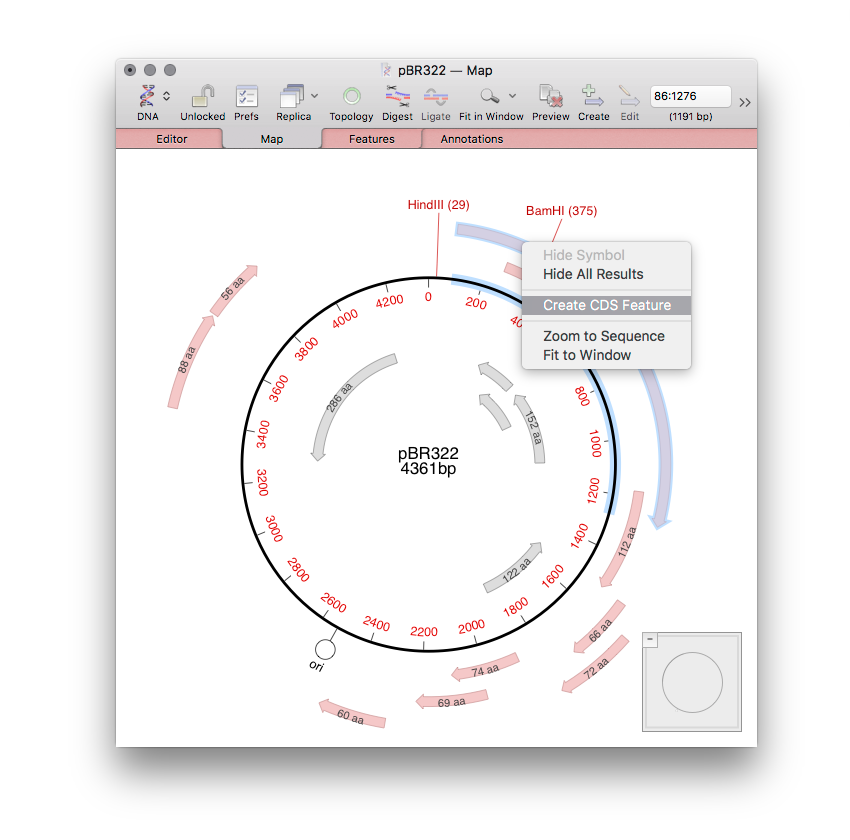
As well as Scan for.. Missing Features that shows annotation on your sequences, you may have noticed extra CDS features annotated to your sequences. These are from the Scan for.. Open Reading Frames tool that automatically scans every DNA sequence window for open reading frames and displays the results in the Map tab. It’s very useful,…
-
Use the Replica Button For Synchronized Views
Most primary MacVector windows (Nucleic Acid Sequence, Protein Sequence, Multiple Sequence Alignment, Align To Reference, Contig Assembly etc.) have a Replica toolbar button. If you click that button, a second window will open, potentially set to a different tab. The key to this functionality is that the two windows are linked – any selections you…
-
How to Identify Bacterial Promoters Using MacVector
MacVector’s Subsequence tool is a very flexible search function that can be used for a variety of tasks. MacVector itself has a built-in variant of the function for maintaining and search primer databases (Analyze | Primer Database Search…). Each entry in the file MacVector uses as a source of subsequence data can have up to…
-
Import Multi-Sequence Genbank Files into an Assembly Project for easy access to Features
There are many genomes in the Genbank database that cannot be downloaded as single annotated sequences. These might be large multi-chromosome eukaryotic genomes, but, increasingly, partially sequenced bacterial chromosomes where the major contigs have been annotated using the NCBI annotation pipeline. Typically, when you encounter these, there are options to download annotated versions of these…
-
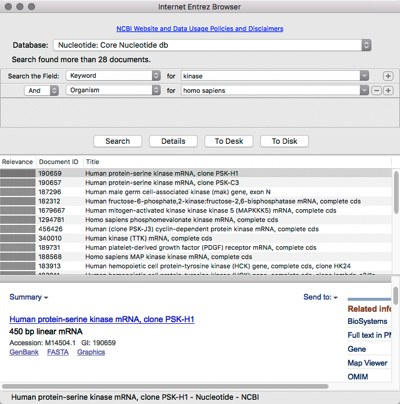
Searching and downloading sequences from Entrez
MacVector has integrated connectivity to the NCBI BLAST and Entrez databases. You can directly search Entrez for DNA or Protein sequences based on features, authors, keywords etc and directly download them into MacVector, complete with all features and annotations.
-
Using MacVector’s Auto Annotate tool to annotate blank sequences.
Have you ever been sent a plain unannotated sequence, or downloaded a sequence from Entrez and been disappointed as it doesn’t have the carefully curated graphical appearance of your favorite genes? Auto annotation solves both of these common problems. The basic idea is that you can scan the sequence against a folder containing a…
-
Annotating primers to your sequence with MacVector
Designing a pair of primers to amplify a single feature is pretty quick with MacVector. Once you have designed a pair of primers with MacVector, you can quickly annotate both the primers and product to your sequence template. The annotation contains a timestamp and the primer’s characteristics. It also contains the full sequence of the primer,…
-
MacVector are at the ASCB – EMBO 2017 meeting in Philadelphia
The MacVector team will be at the ASCB/EMBO 2017 meeting this coming Sunday. The conference starts on Sunday the 3rd of December and runs until Tuesday the 5th. It’s being held at the Pennsylvania Convention Center. Our booth is 1002. If you are in Philadelphia for the conference please pop along and say “hi!”. We…
-
Downloading hits from the MacVector BLAST Map results tab
MacVector’s BLAST Map results tab (added in MacVector 15.5) is a unique interface for examining the annotations around hits to a query sequence. Each pane in the display represents a High Scoring Segment Pair, as seen in the BLAST Aligned Sequence tab. At the lower left corner of each pane is a Download button –…